
We get it—whether you’re an OnlyFans subscriber or creator, privacy matters. You don’t want random mail showing up at your door or your parents finding out about your OnlyFans. So, you may wonder, “Does OnlyFans send mail to my home or office?”
Also, it’s 100% smart to know exactly what happens with your address before you start an OnlyFans account. Are you safe from physical mail, or could the platform send something to your house?
We’ll answer all these questions and more here. Let’s dive in!
TL;DR
- OnlyFans generally doesn’t send physical mail to creators or subscribers.
- U.S. creators earning over $600 receive a 1099 tax form at the address on their W‑9 form.
- The only way to stop receiving tax forms in your house is to delete your OnlyFans account.
- Your billing or home address is private and not visible to others.
Does OnlyFans Send Mail to Your House as a Creator?
No, generally, OnlyFans doesn’t send any physical mail to creators. All communication, verification, and payments are digital.
That said, there’s one important exception for U.S.-based creators who earn income on the platform. If you live in the United States and earned over $600 USD in the previous tax year, OnlyFans will issue an IRS Form 1099. According to the official OnlyFans Help Center:
“If you are a resident in the US and have earned and withdrawn more than $600 USD in the previous tax year, you will receive an IRS Form 1099.
A copy of your 1099 Form will be filed with the IRS and mailed to the address on your W-9 form. If your address changes, please update your W-9 form to ensure you receive your tax documents.”

So, OnlyFans may send one piece of mail to creators: your tax form, but only for compliance with U.S. tax law, not for marketing or content purposes.
Keep in mind that if you live outside the U.S. or haven’t made over $600, you won’t get any mail from OnlyFans.
Does OnlyFans Send Mail to Your House as a Subscriber?
No, as a subscriber to OnlyFans, you will not receive any physical mail to your house. As already mentioned, OnlyFans handles all communication, payments, and content delivery digitally.
The only thing you might see is a line on your bank or card statement showing a charge related to OnlyFans. However, that’s a financial transaction, not a piece of mail.
Please note that the address you provide when subscribing (billing address or card address) is used for verifying your payment method. It doesn’t mean the company will “mail you stuff”.
Can I Stop OnlyFans from Sending Mail to My House?
If you’re a U.S.-based OnlyFans creator and earned over $600, there’s no way to stop OnlyFans from sending your tax forms. They’ll send a 1099 to the address you put on your W-9.
The only way to avoid getting these tax documents would be to delete your OnlyFans account.
Other than that, creators don’t get any physical mail. If you’re not in that tax-form situation, there’s nothing to worry about; your mailbox stays clear.
In fact, the platform is very strict about keeping users safe. You can even make money on OnlyFans without showing your face.
Why Does OnlyFans Need My Address?
When you create an OnlyFans account, the platform asks for some personal info. This helps handle payments, taxes, and legal requirements properly.
Your address is part of this info, but it’s only needed in specific cases—not for marketing or extra verification. Here are the two main reasons OnlyFans may need your address:
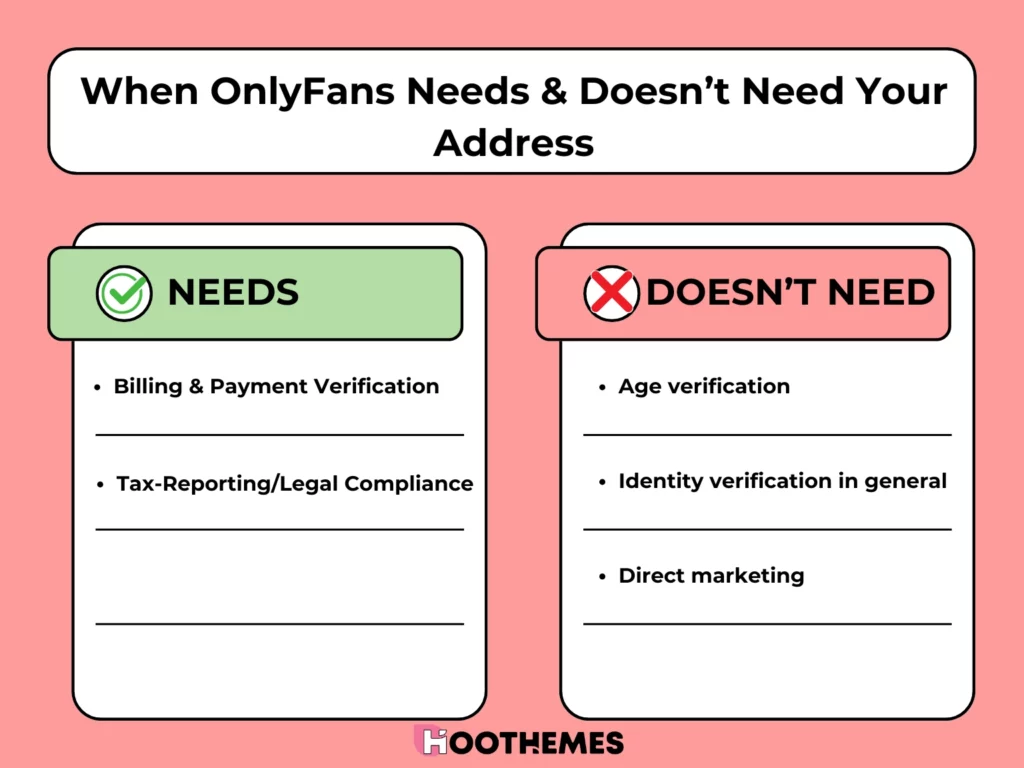
For Billing & Payment Verification
First, OnlyFans requires your billing address to ensure your payment method—a card or bank account—matches your info. This prevents fraud and unauthorized transactions. If your address isn’t correct, payments or payouts might not process properly.
For Tax‑Reporting/Legal Compliance
OnlyFans also needs your address for tax purposes. They use it to send your IRS Form 1099 based on the information you provide in your W‑9.
This helps you report your earnings correctly to the IRS. In other countries, you may need to provide your address to follow local tax rules.
Note: A W‑9 is a standard IRS form where you provide your legal name, taxpayer ID, and address so the government can track your income.
What OnlyFans Does NOT Use Your Address For?
As mentioned above, OF needs your residential address (for creators) and billing address (for both creators and fans). That said, the steps below don’t require you to share your address.
- Age verification: OnlyFans verifies age via government ID and selfie through a third-party service (Ondato). You don’t need to provide your physical address.
- Identity verification in general: The same third-party ID process also confirms your identity. So, no address needed.
- Direct marketing: OnlyFans does not send promotional mail to your house.
Does OnlyFans Send Emails?
Although OnlyFans doesn’t send physical mail, it occasionally sends emails to both creators and subscribers.
These emails are usually about your account activity, security, or payments, not for marketing or spam.
What Types of Emails Does OnlyFans Send to Subscribers?
If you subscribe to creators, you’ll receive emails for things like:
- Login alerts: OnlyFans emails you when someone logs in from a new device or location. It helps protect your account from unauthorized access.
- Payment updates: You get receipts for successful payments, subscription renewals, or failed transactions.
- Account changes: Any updates to your password, email, or other profile details trigger a confirmation email.
What Types of Emails Does OnlyFans Send to Creators?
Creators receive more types of emails, since they handle payouts and content management. Here is when an OnlyFans creator receives emails:
- Payout notifications: You’ll get emails when your withdrawals are processed or if there’s ever a payment issue.
- Subscriber updates: OnlyFans will send you an email when someone subscribes, renews, or tips you.
Policy and content updates: It also informs you about new rules, compliance reminders, or feature launches.
Performance insights: Sometimes, OnlyFans shares updates about your earnings, engagement, or other account stats.
Note: Whether you’re a creator or a subscriber, you can change your notification preferences to stop receiving certain types of emails. However, you cannot disable email notifications for:
- Account verification,
- transactional communications,
- changes/updates to features of the service,
- technical and security notices.
What Official OnlyFans Emails Look Like?
OnlyFans emails are short, professional, and always related to your account activity. They come from addresses ending in onlyfans.com or [email protected].
This is what an official OnlyFans email looks like:

⚠️ Tip: If an email asks for your password, 2FA code, or includes suspicious links, it’s not from OnlyFans. Always double-check the sender’s domain before clicking anything.
To Wrap Things Up
To conclude, OnlyFans takes your privacy seriously. Your personal info, like your address and payment details, is safe and secure. The only time you’ll get physical mail is if you’re a U.S. creator earning over $600, and that’s just for tax purposes.
Besides, creators or subscribers won’t receive emails to their billing address, home, or office. So, you can enjoy OnlyFans without worrying about unexpected letters showing up.
FAQs
Here are some common questions about the topic:
No, OnlyFans doesn’t send physical mail to your home or your parents. All communication happens through the email address you used to sign up.
Yes, if you’re a U.S. creator and earn over $600, OnlyFans sends you a Form 1099-NEC for tax reporting to the address on your W-9 form.
No, OnlyFans doesn’t send physical mails to creators. They just send the IRS Form 1099 to U.S creators who earn over $600.
No, people cannot see your address on OnlyFans. Your billing or home address is private and only used for payments, tax forms, and identity verification.
No, OnlyFans generally does not send mail to your billing address. It sends the official tax or legal documents to the address you provide on your W‑9. Your billing address is mainly used for payment verification, not for receiving physical mail.
Yes. OnlyFans may send official tax documents, like IRS Form 1099 for U.S. creators, but only to the address you provide on your W‑9.