
There are over 300 million fans and around 4 million creators on OnlyFans. That’s a huge community on both sides. Still, some people get tired and start thinking about how to delete OnlyFans account.
Maybe you joined to find someone on OnlyFans, but never did. Or you’re a creator who isn’t making enough and wants to move on. Whatever the reason, deleting your account permanently is easy once you know how.
In this guide, we’ll show you step by step how to delete your OnlyFans account, as a subscriber or a creator. You’ll also see what happens after deletion and how it works on both desktop and mobile. Let’s get started!
TL;DR
- Creators and subscribers can delete their OnlyFans account via Settings → Account → Delete Account on desktop or mobile browser,
- Subscribers must cancel active subscriptions before deleting them. No refunds are given,
- Creators must withdraw all earnings and wait for subscriptions to expire,
- Permanently deleted accounts cannot be recovered; disabled accounts may be appealable.
How to Delete OnlyFans Account Permanently As a Subscriber
To permanently delete a fan account, you first need to cancel all your OnlyFans subscriptions (if you have). Let’s get started with deleting your OF profile on the computer.

Deleting an OnlyFans Subscriber Account on PC
Remember, once you cancel your subscriptions and disable your account for good, your money is gone. In fact, there will be no refunds. With this in mind, here’s how to delete your OnlyFans account on PC:
Step 1: Cancel Your Subscriptions
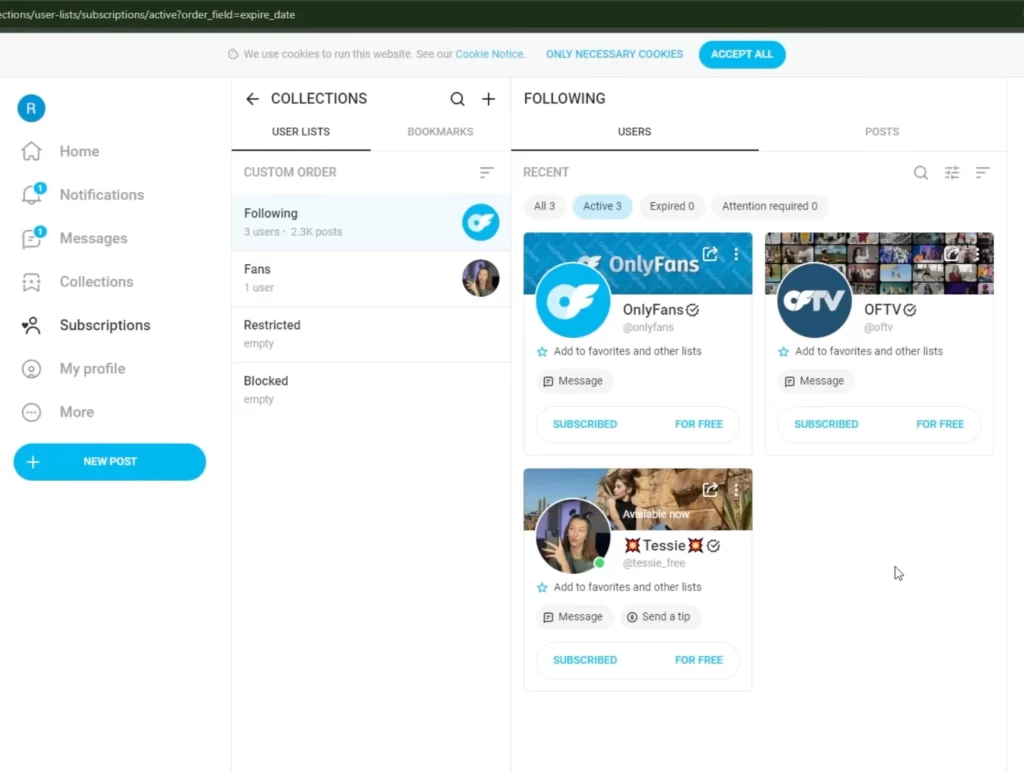
- Go to OnlyFans.com, log in to your account, and tap on ‘Subscriptions’ in the left-side menu,
- Now, open ‘Following’ and find the creator you want to unsubscribe from,
- Click ‘Unsubscribe’, choose a reason, and confirm unsubscription.
Step 2: Go to Your Profile
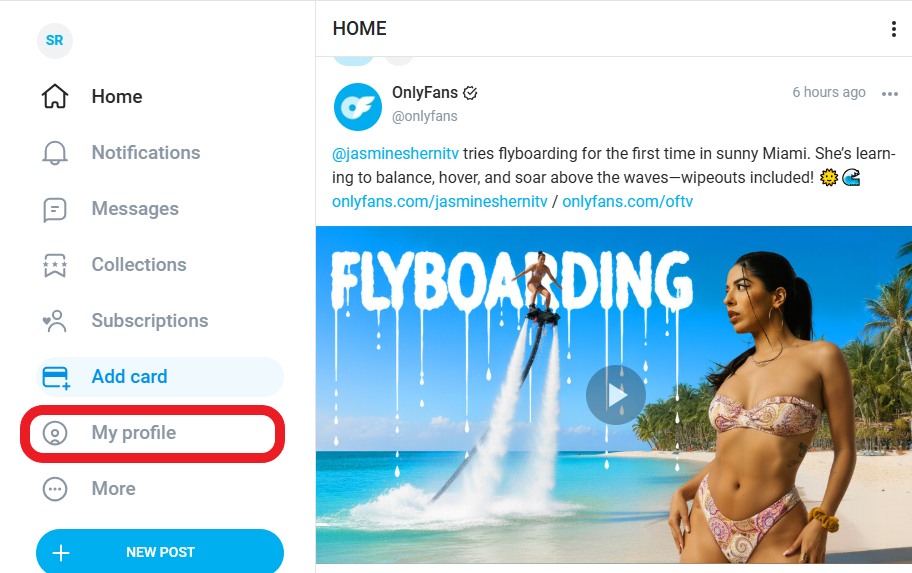
After you’ve unsubscribed from the creator, tap ‘My Profile’ on the left side, right under ‘Add Card’,
Step 3: Go to Settings
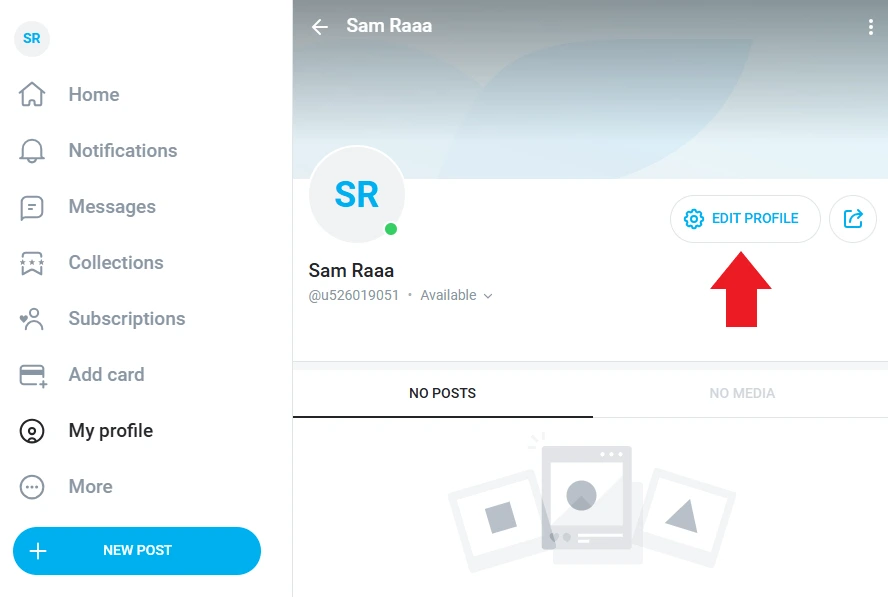
Next, click on ‘Settings’ or ‘Edit Profile’,
Step 4: Tap Account
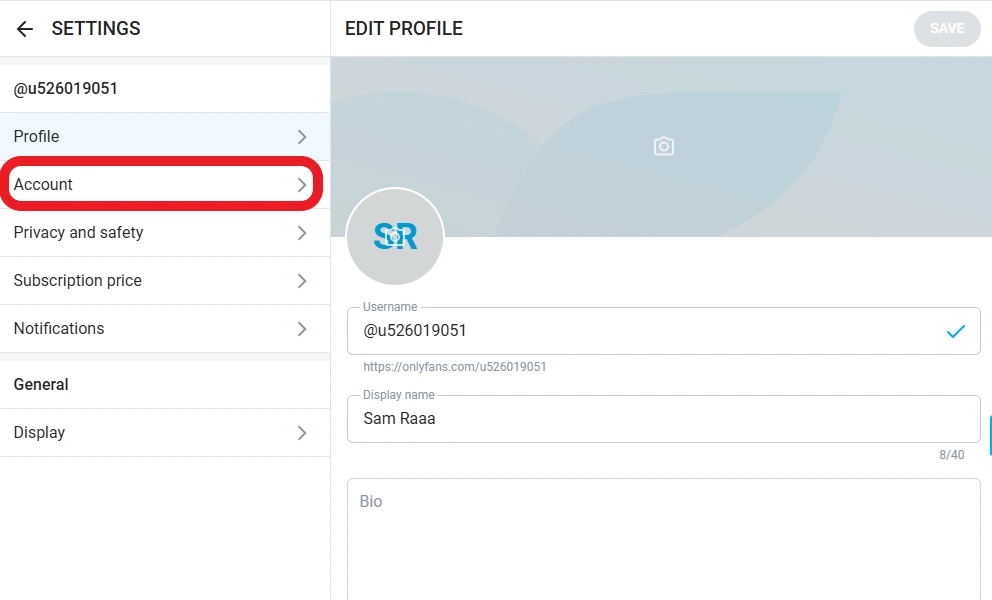
From the left-side menu, click ‘Account’,
Step 5: Find Account Management
Now, go to ‘Delete Account’, under ‘Account Management’,
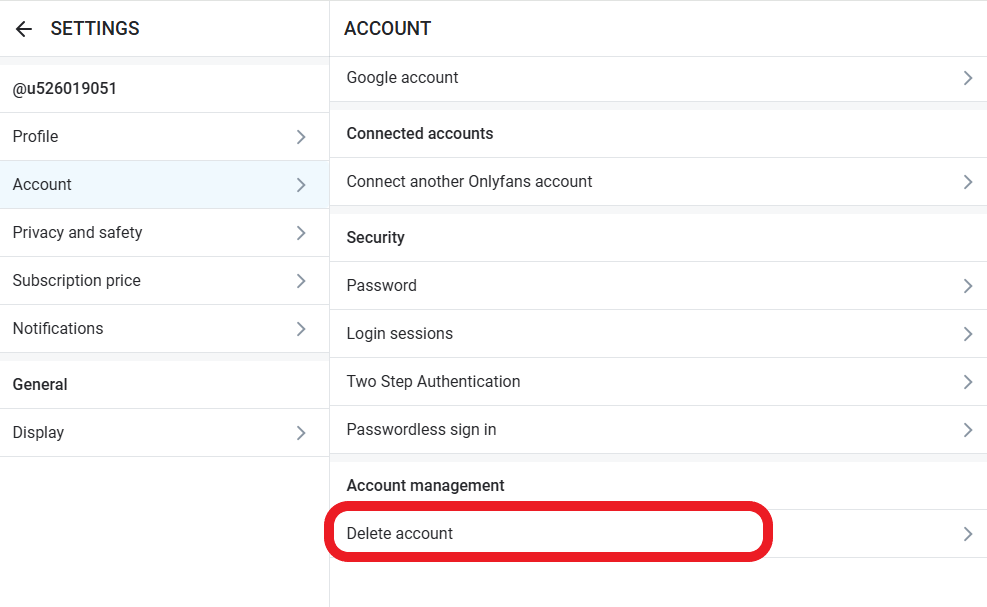
Step 6: Enter Verification Code and Delete Your Account
Finally, you’re asked to enter a verification code in the box, hit ‘Delete Account’, and it’s done!
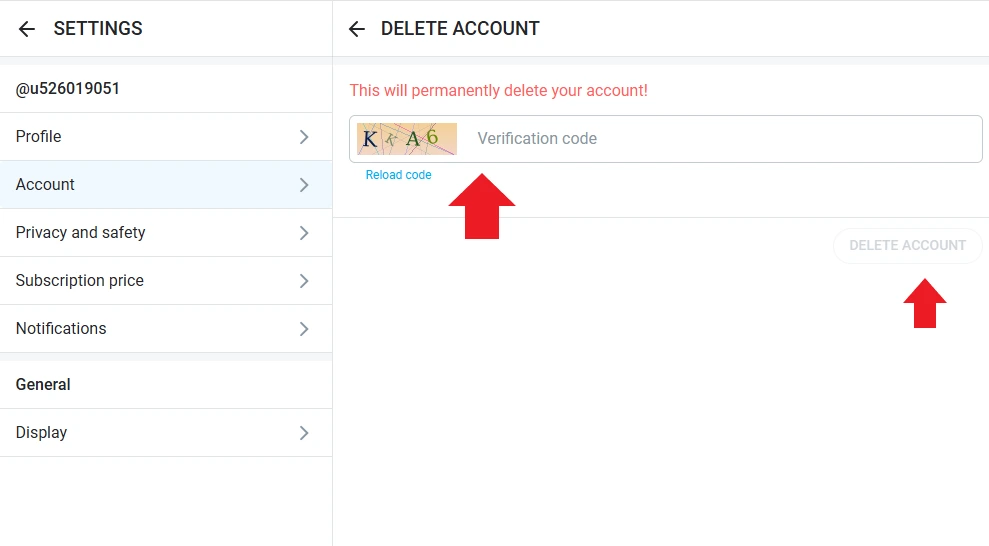
Deleting an OnlyFans Subscriber Account on iPhone and Android
OnlyFans doesn’t have a mobile app, so you need to disable your account through a mobile browser (Chrome, Safari, etc). To delete your OnlyFans profile on iPhone (Safari), follow these steps:
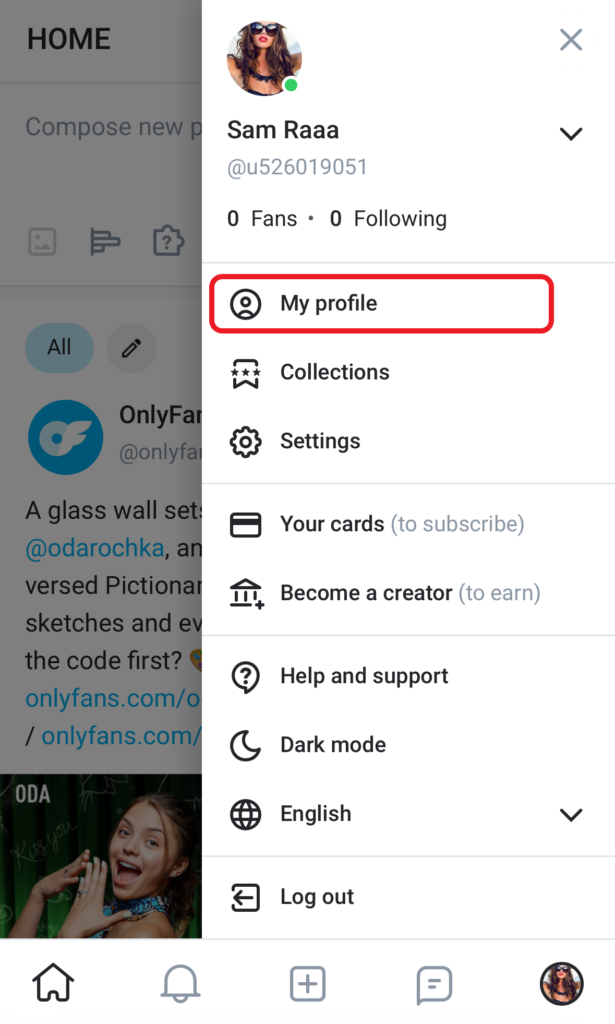
- Go to OnlyFans.com, sign in to your account, and tap ‘My Profile’ (Settings),
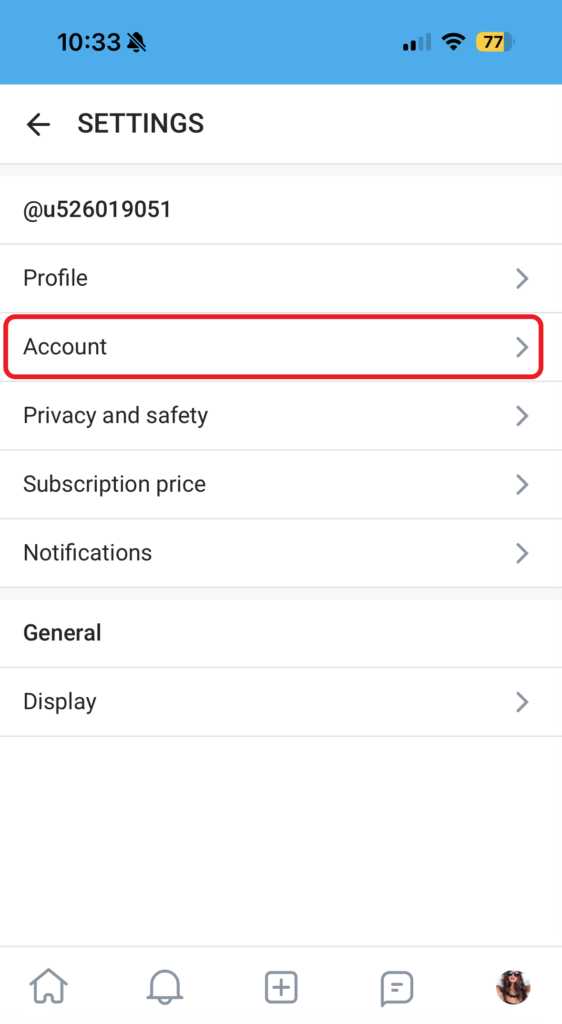
2. Choose ‘Account’,
3. Move down to ‘Account Management’ and tap ‘Delete Account’,
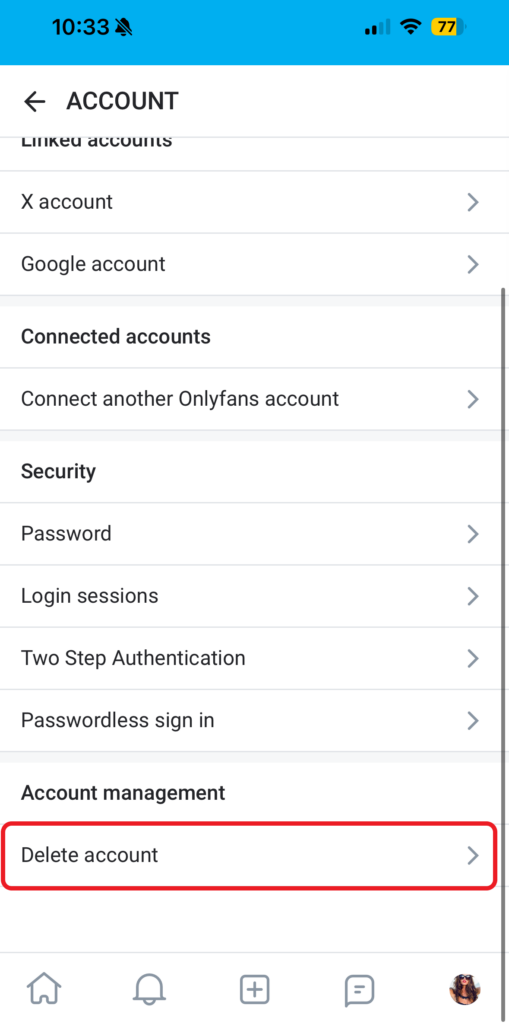
4. Enter the verification code, hit the ‘Delete Account’ button, and confirm deletion.
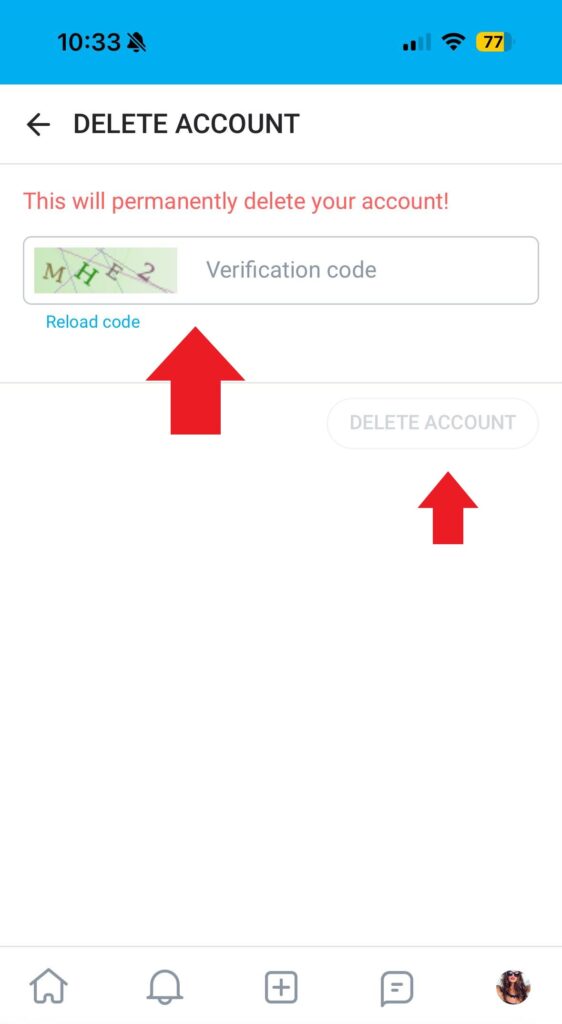
Deleting an OnlyFans account on Android is just like on PC or iOS. Open your browser, log in, go to ‘Delete Account’, complete the CAPTCHA, and you’re done.
What Happens When You Delete an OnlyFans Subscriber Account?
Here is what happens when a subscriber permanently deletes an OnlyFans account:
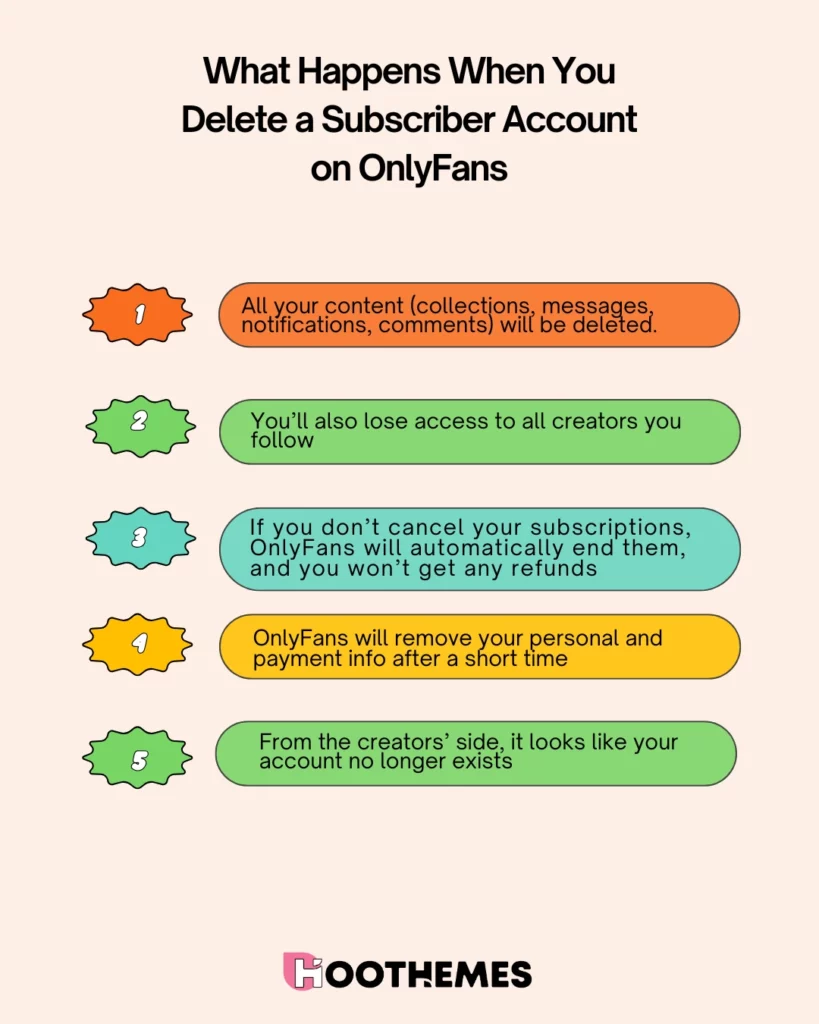
- All your content (collections, messages, notifications, comments) will be deleted. So, if you want to keep any of the content, save it anywhere. While you can screenshot an OnlyFans creator’s content, it’s advised to avoid it due to legal concerns.
- You’ll also lose access to all creators you follow.
- As mentioned earlier, you should cancel all subscriptions before deleting your account. If you don’t, OnlyFans will automatically end them, and you won’t get any refunds.
- OnlyFans will remove your personal and payment info after a short time.
- From the creators’ side, it looks like your account no longer exists.
How to Delete OnlyFans Account Permanently As a Creator
The deletion process for OnlyFans creators is almost the same as for fans. But there’s one difference: creators can’t delete their accounts if they still have active subscriptions or pending payouts.
They need to wait until their last subscriber’s renewal ends and all earnings are paid out. After that, they can delete their account. Here’s how to delete an OnlyFans creator account on PC:
- Log in to your account with your email and password,
- Tap ‘My Profile’ in the left-side menu,
- Click ‘Settings’ or Edit Profile’,
- Open ‘Account’,
- Scroll down to ‘Account Management’ and tap ‘Delete Account’,
- Enter the verification code in the box and confirm deletion.
What Happens When You Delete Your OnlyFans Creator Account?
You may have decided to start your OnlyFans account years ago, but now feel burned out and want to delete it for good. It’s important to understand how this will affect your content, subscriptions, and earnings.
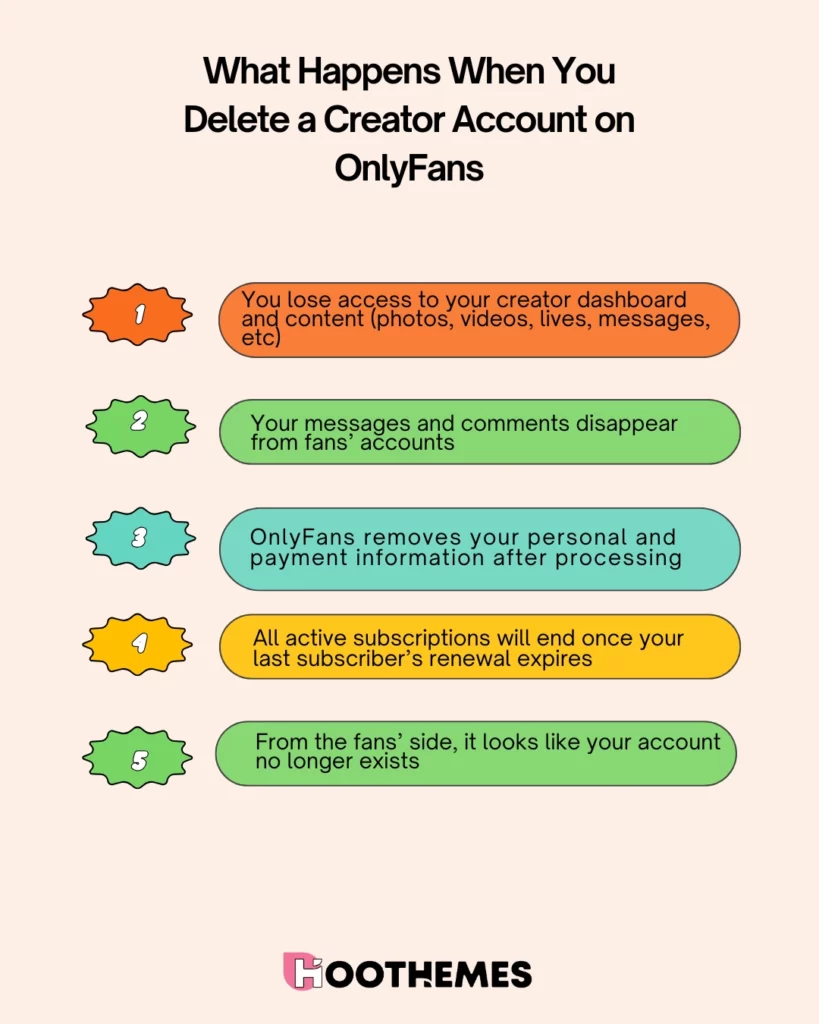
- You lose access to your creator dashboard and content (photos, videos, lives, messages, etc).
- Your messages and comments disappear from fans’ accounts.
- OnlyFans removes your personal and payment information after processing, and for anyone wondering whether OnlyFans sends mail, no physical mail is sent as part of this process.
- All active subscriptions will end once your last subscriber’s renewal expires.
- From the fans’ side, it looks like your account no longer exists.
How to Delete an OnlyFans Account with Money in the Wallet?
You can’t delete an OnlyFans creator account if you have money in your wallet. In fact, you have to withdraw all your earnings first. Here’s a step-by-step guide for creators to withdraw earnings from OnlyFans:
- Log in to your account and tap ‘Statements’ from the left-side menu,
- Now, choose ‘Payout Requests’ and find your ‘Current Balance’,
- Next, you should select from ‘Manual’ or ‘Automatic’ payouts,
- Hit the ‘Request Payout’ button, confirm your request, and it’s done!
OnlyFans withdrawals usually take 1–3 business days, depending on your payout method and country. Once you get paid, you can follow these steps:
Account → Settings (Edit Profile) → Account Management → Delete Account → Entering Verification Code → Confirm Deletion.
Note: Subscribers with active subscriptions should cancel them before deleting their account. If not, they’ll lose that money; OnlyFans doesn’t give refunds.
How to Delete Your OnlyFans Account Without Logging in?
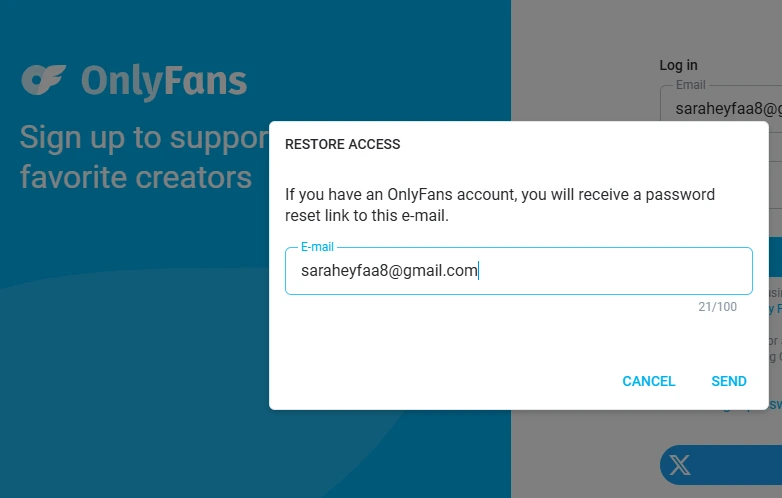
It’s not possible to delete an account (subscriber or creator) on OnlyFans without logging in. To take any action on your profile, you first need to sign in. That said, if you’ve lost or forgotten your password, you can try a password reset first:
- Go to the login page and click ‘Forgot Password?’,
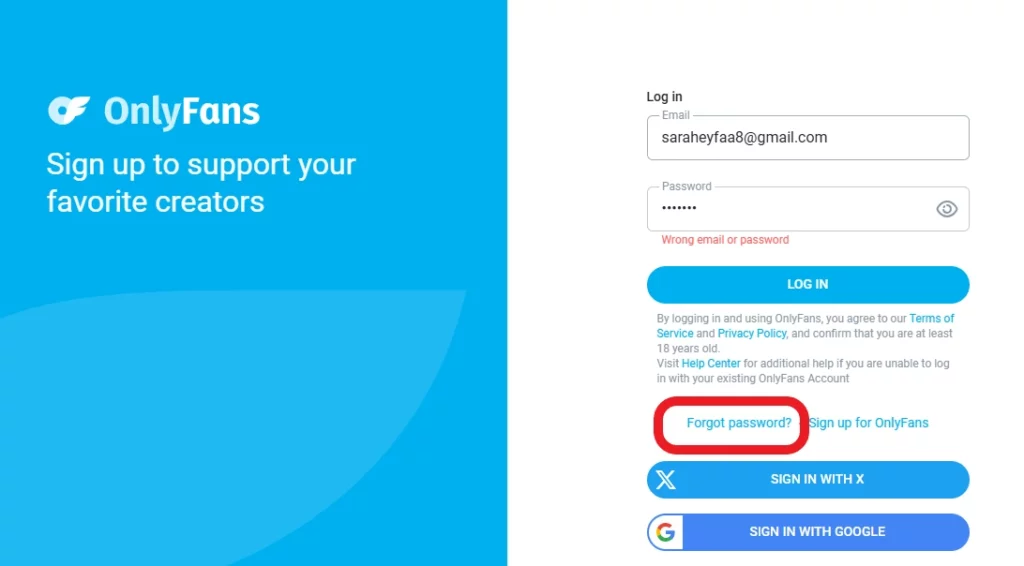
- Enter your email in the box, tap ‘Send’, and OnlyFans will send you a password reset link.
If the reset fails, you can send an email to [email protected], explain the problem clearly, and wait for the reply in a few days.
Bottom Line
You might want to save money and decide to delete your OnlyFans account. Creators, on the other hand, might want to step away from adult content for good. Whatever the reason, knowing how to delete OnlyFans account is important.
The good news is that the process is simple. Just log in, go to Settings → Account → Delete Account, and follow the prompts.
Remember, if you’re a subscriber, cancel your subscriptions first. Otherwise, OnlyFans will end them automatically, and you won’t get any refunds. For creators, deletion is only possible after all money in the wallet has been withdrawn.
Deleting your OnlyFans account can actually give you peace of mind, control over your money, and a fresh start. So, make sure you follow the steps carefully.
FAQs
Here are a few questions about how to delete your OnlyFans account:
Yes, you can delete your account on OnlyFans, whether you’re a creator or subscriber. You just need to sign in to your profile, go to ‘Settings’ (Edit Profile), choose ‘Account’, tap ‘Delete Account’ within ‘Account Management’, enter the verification code, and remove your account permanently.
Unfortunately, no. OnlyFans doesn’t have a feature like Instagram to deactivate your account temporarily. Once you delete your account, it’s gone for good.
OnlyFans account deletion happens immediately. However, OnlyFans may keep your personal data (name, address, payment details, etc) for up to six months before it’s completely deleted.
Yes, for subscribers, once a fan deletes their account, all subscriptions are canceled automatically. They won’t receive any refunds. For creators, they can’t delete their account if they have active subscriptions and must wait until they expire.
You can’t delete an OnlyFans account without a verification code. It’s a required step in the process.
No, if you permanently delete your OnlyFans account, it cannot be recovered, but if OnlyFans disabled it for violations, you might be able to appeal.